

Advantages Checklist
eBacon's exclusive bona fide fringe trust is a proven money saving $$$ solution! See all the advantages...

Integrations
Supported Accounting Packages
API

QuickBooks does not generate certified payroll reports on its own. Learning how to file certified payroll while your books live in QuickBooks means building a process on top of QuickBooks, since it was built for general bookkeeping, not for prevailing wage compliance.

That gap matters the moment a contractor wins a Davis-Bacon covered job. The Department of Labor requires a signed weekly report, usually Form WH-347, for any federally funded or assisted construction contract over $2,000. QuickBooks can track hours and pay employees, but it does not know a wage determination from a pay period. Getting from QuickBooks payroll data to a compliant certified payroll report takes a defined process, and often a connected compliance tool, to close that gap.
 Certified payroll is a weekly, signed payroll report required on covered public construction projects. It certifies that workers were paid at least the prevailing wage set by the Department of Labor for their classification, including any required fringe benefits.
A few terms come up constantly once QuickBooks payroll data has to become a certified payroll report:
Keep QuickBooks job and cost codes clean before payroll runs, not after. Reclassifying hours after the fact is where most reporting errors start. Set up a standing weekly reminder tied to the pay date rather than relying on memory, since Statement of Compliance deadlines do not move.
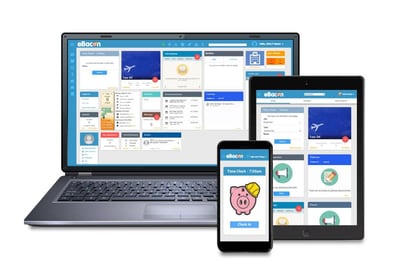
This is also where a connected system earns its place. eBacon connects to QuickBooks and other accounting platforms to sync job and general ledger data, then generates the WH-347 and state-specific certified payroll reports directly from that same payroll data, so numbers do not need a second manual pass between systems.
The most common mistake is treating QuickBooks payroll totals as certified payroll ready. Gross wages alone do not show classification accuracy or fringe compliance, which is what an auditor actually checks. A close second is annualizing fringe benefits incorrectly, or not annualizing them at all, which can understate what was actually credited toward the prevailing wage.
Missing the weekly cadence is another frequent issue. A late or skipped submission, even for a week with no covered work in some jurisdictions, can trigger a compliance flag on its own.
Certified payroll works when the process behind QuickBooks is consistent, not when someone remembers to build a report by hand every week. Confirm covered jobs early, keep classifications clean at the source, and treat the weekly Statement of Compliance deadline as fixed. eBacon's Certified Payroll product page walks through how the platform ties time tracking, wage determinations, and reporting into one workflow for contractors who want QuickBooks to keep handling the books while compliance runs on its own track.
Contractors can see how eBacon connects to QuickBooks and automates WH-347 reporting with a live product tour. Book a demo to walk through how your own job and payroll data would move from QuickBooks into a certified payroll report.
No. QuickBooks tracks hours and processes pay, but it does not generate WH-347 forms or check prevailing wage compliance on its own.
QuickBooks Online is not built to calculate prevailing wage rates or fringe annualization. Most contractors pair it with a dedicated compliance system for that part of the work.
The WH-347 is the standard federal certified payroll report, required weekly for contractors and subcontractors on Davis-Bacon covered contracts over $2,000.
Federal rules require contractors to keep certified payroll records for at least three years after the prime contract is completed.

