

Advantages Checklist
eBacon's exclusive bona fide fringe trust is a proven money saving $$$ solution! See all the advantages...

Integrations
Supported Accounting Packages
API
Free Construction Self-Check
Benchmark your business compared to the best-in-class methods… in certified payroll, field operations and more. You get a score with specific insights on what to fix first and why it matters.
Actionable Insights + Smart Solutions

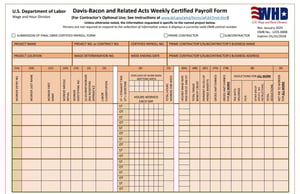
The WH-347 form is the U.S. Department of Labor's weekly certified payroll report for construction work covered by the Davis-Bacon and Related Acts. The old version expired on September 30, 2026, so every team filing federal certified payroll now needs the revised form.
Getting it right protects your cash flow, since one wrong classification can trigger back wages.

The WH-347 form is an optional DOL template that contractors and subcontractors use to submit weekly certified payrolls on federal and federally assisted construction projects. The form is optional, but the weekly payroll information is required in some format. Each report lists every covered worker, their job classification, daily and weekly hours, wages, fringe benefits, and deductions. A signed Statement of Compliance must go with every payroll.
The revised form, released in January 2025 and approved through January 31, 2028, adds worker entry numbers, apprentice status, the wage determination number, and more detail on fringe plans. DOL also offers an online fillable version.
Every contractor and subcontractor on a Davis-Bacon job must submit certified payroll for each week covered work happens. That includes federal construction contracts over $2,000 and many projects funded with federal grants, loans, or loan guarantees. Prime contractors are responsible for their subcontractors' certified payrolls too.
Watch this video and learn all about the new WH-347 certified payroll form and how to complete it [officially in effect since January 6, 2025].
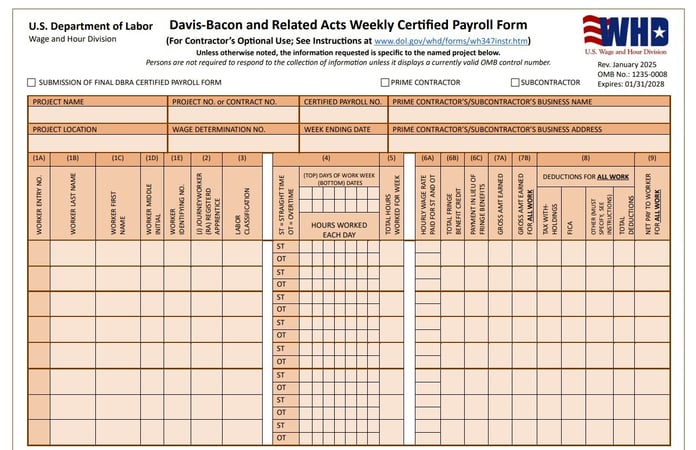
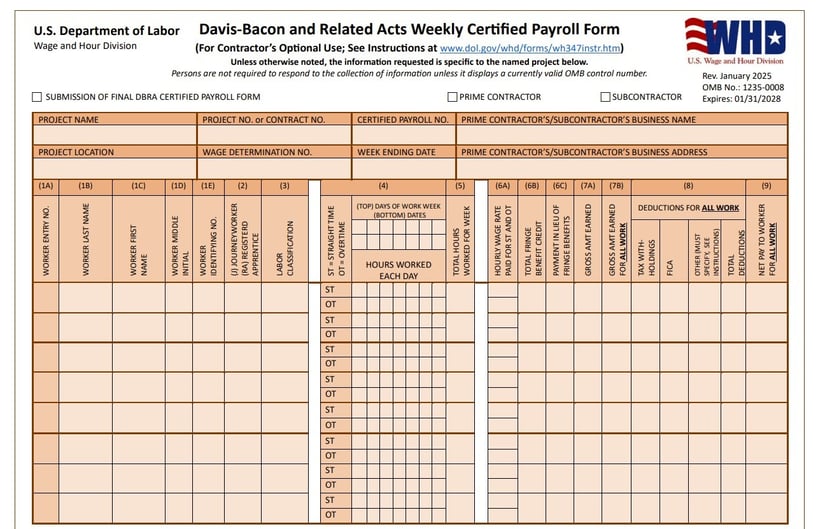
You fill out the WH-347 form in nine steps, from the project header to one line per worker, then page 2 and your signature. Every number must match your payroll records.
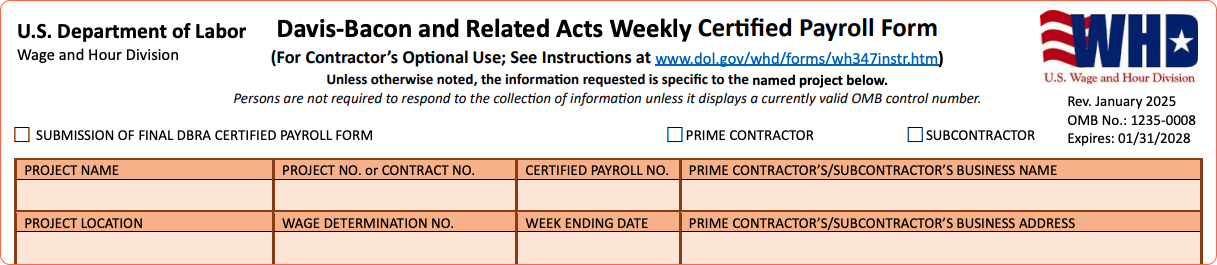
Check whether you are the prime contractor or a subcontractor. Check the final payroll box only on your last payroll for the project. Then enter your business name and address, the project name, number, and location, the wage determination number, the certified payroll number, and the week ending date. Start the payroll number at 1 and go up by one each week.
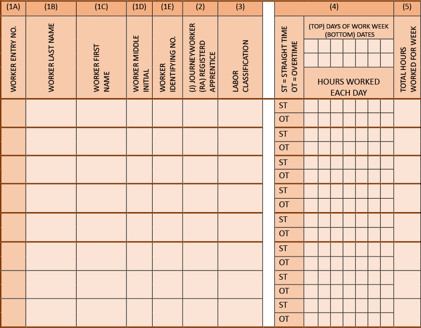
Give each worker an entry number, then enter their full name and an identifying number, such as the last four digits of their Social Security number. Full Social Security numbers, home addresses, phone numbers, and emails stay off the report but stay in your payroll records.
Mark each worker as a journey worker or a registered apprentice. Then enter the labor classification from the wage determination that matches the work they actually did. A worker who did two types of work gets a separate line for each classification.
Enter daily hours and the weekly total, with straight time and overtime on separate lines. Hours must match field timecards.

Enter the hourly rates you actually paid for straight time and overtime. Then enter the total fringe credit and any cash paid instead of fringe benefits. For example, a $15 hourly fringe credit for 8 hours worked equals a $120 total credit.
Enter gross pay earned on this project, gross pay for all work that week, deductions for all work such as taxes and FICA, and net pay.
If you claimed a fringe credit, list each plan's name, type, and hourly credit, and mark whether it is funded or unfunded. If apprentices appear on the payroll, enter their registered apprenticeship program details.
An authorized official signs the Statement of Compliance with an original or valid electronic signature and adds their name, title, phone number, and email. The signature certifies that each worker got at least the required wage and fringe.
Submit each certified payroll within seven days after the regular pay date. Many agencies also require a no-work statement for weeks with no work, so check your contract. Keep payroll records for at least three years after all work on the prime contract is finished.
eBacon generates the WH-347 with one click, so hours, rates, and fringe credits come straight from payroll instead of being retyped.
Wrong classifications and fringe errors cause the most WH-347 trouble. Watch for these:
Records must be thorough, and falsifying a certified payroll can lead to civil or criminal penalties.

First, confirm every active federal job uses the revised WH-347 form. eBacon's Certified Payroll Reporting page shows how the WH-347, state reports, agency uploads, and no-work letters come out of one system.
eBacon is the only construction-focused platform featuring certified payroll with a money-saving fringe trust. All-in-one software with scheduling, GPS-enabled time tracking, safety system, and inventory management for contractors with 15 to 500 employees.
You can see it in a free eBacon product tour, where we build a revised WH-347 from real payroll data. Book your eBacon product tour.

The WH-347 form itself is optional, but weekly certified payroll is required on Davis-Bacon covered jobs. You can submit in any format that includes all the required information and a signed Statement of Compliance.
No, the previous WH-347 form expired on September 30, 2026. Use the revised version for all federal certified payroll going forward.
Federal rules require certified payroll only for weeks when covered work happens, but many agencies require a no-work statement for the other weeks. Your contract or the contracting agency will tell you which applies.
You report the total fringe credit in column 6B and any cash paid in lieu of fringes in column 6C, then list each plan on page 2. If your fringe dollars go into a bona fide plan, see how eBacon's fringe trust works for non-union crews on the Fringe Benefits page.
No, the WH-347 is a federal form, and many states use their own certified payroll forms and portals.

