Safety SystemNEW
Tracking and reviewing activities to prevent incidents leads to a 57% reduction in OSHA reportable incidents.*
OSHA Reports
Automate OSHA compliance
-
OSHA 301 Incident Report Form
-
OSHA 300 Incident Report Log
-
OSHA 300A Annual Summary Certified eSignature
-
TRIR (Total Recordable Incident Rate)
-
DART (Days Away, Restricted, or Transferred)
Totals automatically calculated.

OSHA uses this data to target high-risk workplaces for safety inspections. High rates also lead to higher workers' compensation premiums and insurance costs.
Beyond gathering information for the first report of injury, get to the root cause(s) of the incident with a thorough investigation process.
Root cause analysis leads to corrective actions to prevent similar incidents from happening.

Toolbox Talks
Keep safety front and center with short, focused crew meetings that are planned, delivered, and documented in one place.
-
Use talks from the OSHA Toolbox Talk library or create your own with PDFs, links, written content, and talking points
-
Schedule recurring talks by jobsite and assign a presenter
-
Presenters deliver the talk and record who attended
-
Employees confirm their own attendance from the Safety widget
-
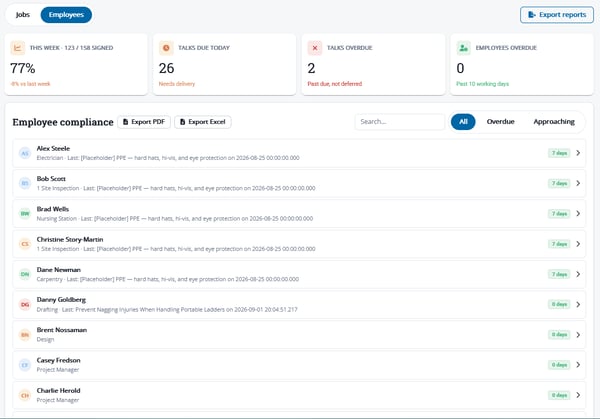
Track compliance by job and by employee
- For Safety Admins
- For Presenters
- For Employees
Organize the Schedule + Content
Create custom Toolbox Talks or pull from the OSHA library. Set up talk schedules for each jobsite, assign Safety Admins or Site Safety Leads to present, and monitor compliance across jobs and employees.
Topic + Attendance
See today's assigned talks right from the Safety widget. Deliver the talk to the crew, record who attended, and follow sign-offs until every attendee has confirmed. Need an extra safety discussion? Give a talk on the fly.
Confirm Attendance
After the talk, employees get an Action Needed reminder in their Safety widget and sign to confirm they attended, creating an employee-verified attendance record.
Safety Binders + Notices
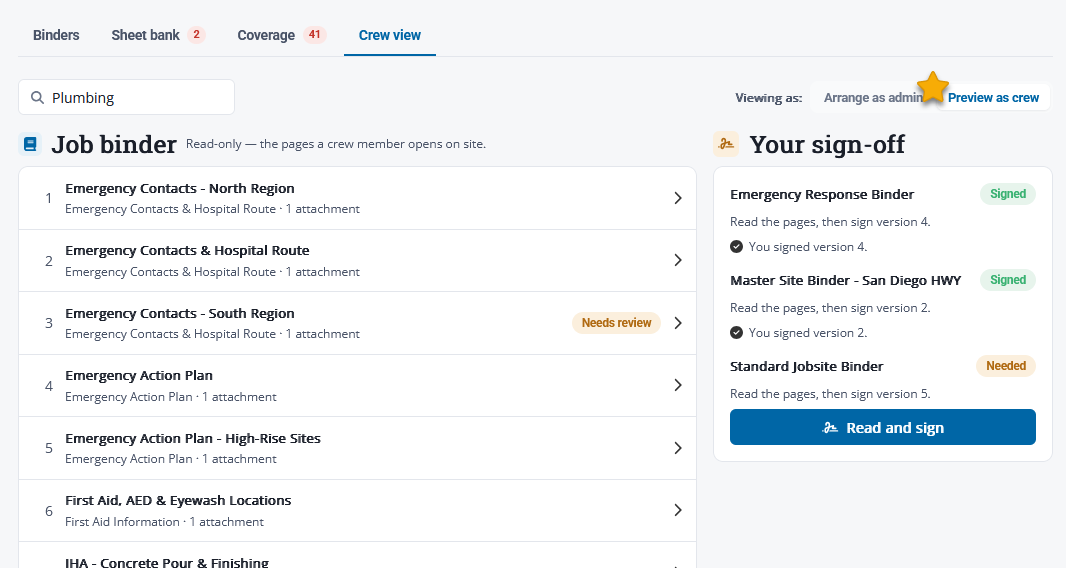
Give every crew instant access to the safety information for their jobsite from a phone, tablet, or computer.
-
Build reusable digital binders with hazard sheets, emergency action and evacuation plans, safety policies, required postings, and Safety Data Sheets (SDS)
-
Assign binders to jobs, with one binder covering as many jobs as needed
-
Collect employee sign-offs on information they must acknowledge
-
Track coverage gaps, review dates, and expiring sheets
-
Print a complete, up-to-date binder whenever a physical copy is needed on site


PPE Requests
Make sure every worker has the protective equipment the job requires. Any employee can request PPE in seconds, and safety leaders can track each request from start to finish.
-
Request PPE from the Safety widget: what's needed, why (missing, damaged or worn, low stock at site), and for which job
-
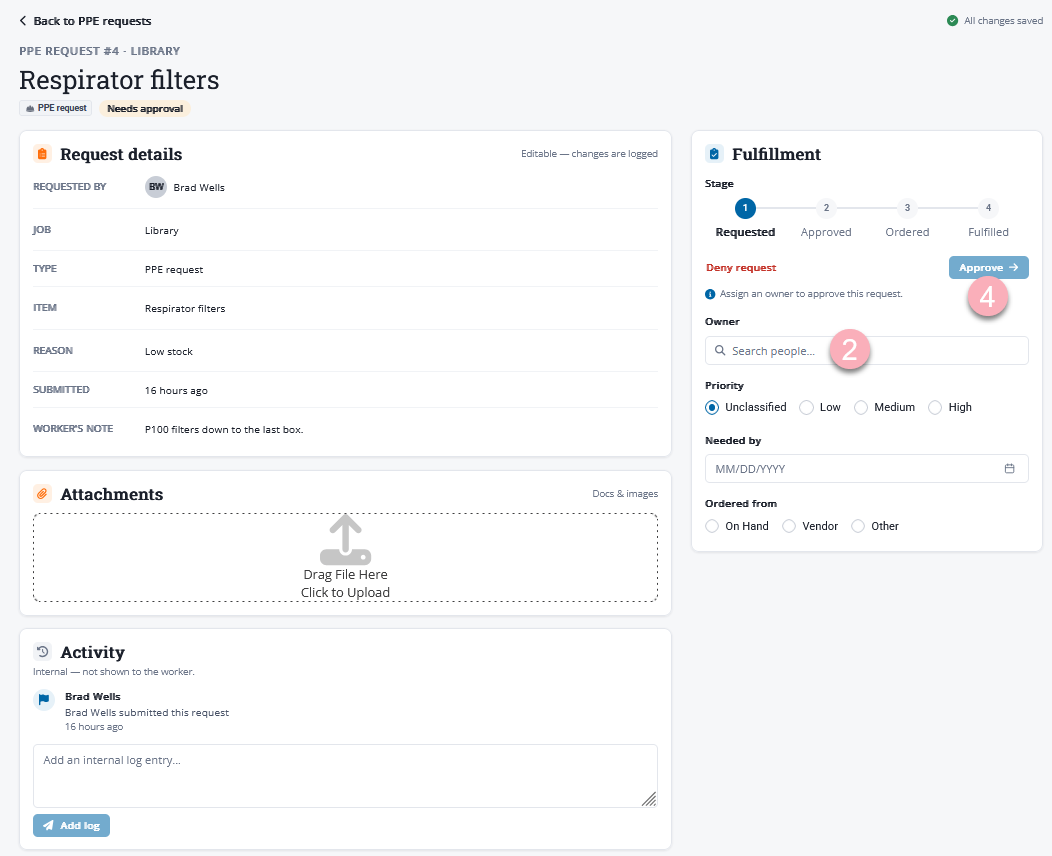
Approve or deny requests and assign an owner to fulfill them
-
Track every request through Requested, Approved, Ordered, and Fulfilled
-
Attach receipts, order confirmations, or signed acknowledgments for a complete record
Forms & Checklists
Replace paper clipboards with digital forms and checklists assigned to the jobs that need them.
-
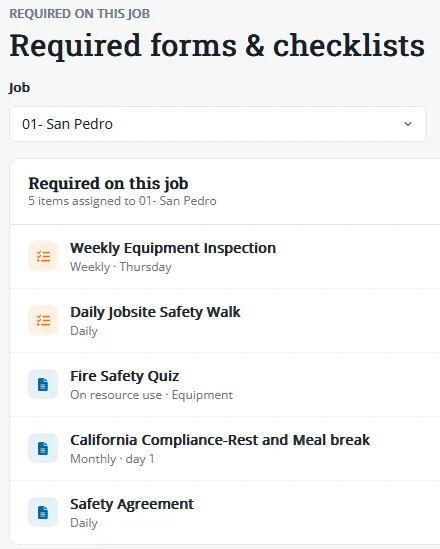
Assign safety walks, equipment inspections, PPE checks, and compliance acknowledgements by job and schedule
-
Group commonly required documents into bundles, such as a new-hire onboarding packet
-
Crews see exactly what's required for their job and fill it out from the Safety widget
-
Monitor completion status, review submissions, and export PDF reports


Safety Observations
Your crews are often the first to spot a hazard. Give everyone a simple way to speak up before someone gets hurt.
-
Log hazards, near-misses, and positive observations from the Safety widget, with up to eight photos
-
Option to submit anonymously to encourage reporting
-
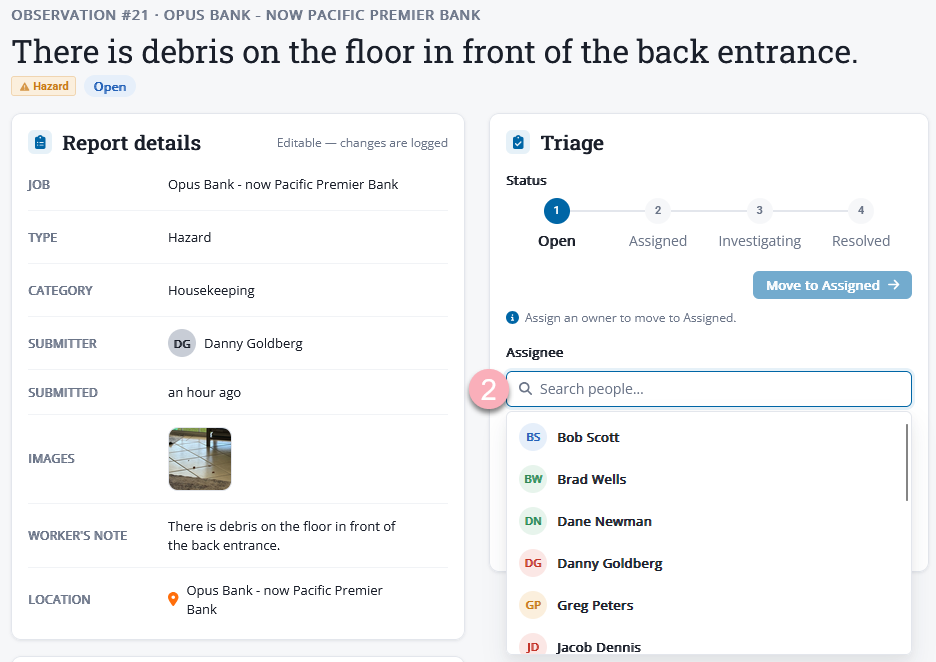
Triage and assign each observation with a severity and target date
-
Track every observation from Open to Resolved with a full activity history
Safety System
Frequently Asked Questions
The presenter records who attended, and each attendee then confirms their own attendance in their Safety widget. That gives you an attendance record confirmed by the employees themselves, not just a presenter's sign-in sheet. Compliance is tracked by job and by employee.
No. The Toolbox Talk library includes OSHA-provided talks you can search by title, OSHA reference, or category. You can also add your own custom talks using PDFs, a link, content written directly in eBacon, and talking points for the presenter.
Not for day-to-day access. Crews can open their job's binder, including Safety Data Sheets (SDS), from a phone, tablet, or computer. If a physical copy is still needed on site, you can print the complete, current binder at any time. Safety Admins get a nightly email listing sheets that have expired or are due for review, so printed copies don't go out of date.
Any employee can request PPE from eBacon mobile app, or use the Safety widget on the dashboard. The employee describes what they need, why, and for which job. Alternatively, a jobsite foreman or safety manager may initiate a new PPE request on behalf of an employee.
Safety Admins get an email when a request comes in. Approved requests are assigned an owner, and each request is tracked through stages; Requested, Approved, Ordered, and Fulfilled. Receipts, order confirmations, or a signed acknowledgment can be attached for a complete record.
The Fulfillment stage completes the PPE Request, confirming when it was given to the employee.
Yes. Each form or checklist is assigned to specific jobs on its own schedule, such as daily, weekly, or monthly. For example, a plumbing job and a landscaping job can each have their own end-of-day safety checklist. Documents that usually go together, like a new-hire packet, can be grouped into a bundle and assigned in one step.
Yes. When logging an observation from the Safety widget, employees can choose "Submit anonymously," and the report is saved without their name. Observations can be logged as a hazard, near-miss, or positive observation, with up to eight photos. Safety leaders can then assign, track, and resolve each one.
eBacon generates them from your incident records. Once an incident is marked OSHA recordable and the required details are filled in, eBacon produces the OSHA 301 form for it. The Form 300 log can be downloaded for any year. The 300A annual summary builds up over the year from your recordable cases and timecard hours, and can be certified and e-signed in the app.
eBacon prepares the forms, but you still submit them to OSHA. After you submit, you mark the incident as submitted and eBacon records the date and time.
Incidents are limited to Safety Admins and Site Safety Leads. Employees don't have access to incident records or OSHA reports. Site Safety Leads can report incidents, while Safety Admins manage investigations and OSHA reporting. For privacy cases, the employee's name can be withheld from the OSHA 300 log.
Safety at the Center
The Safety Center gives Site Safety Leads and Safety Admins one working dashboard for open incidents, observations, PPE requests, and OSHA reports. See what needs triage, filter items assigned to you, and jump straight to any record.
For employees, it's even simpler. They can use the eBacon mobile app to report a concern, request PPE, confirm Toolbox Talk attendance, and open their job's safety binder.
* SOURCE: ABC 2026 Health and Safety Performance Report