Union Payroll & Rate Management
How does eBacon manage union rates?
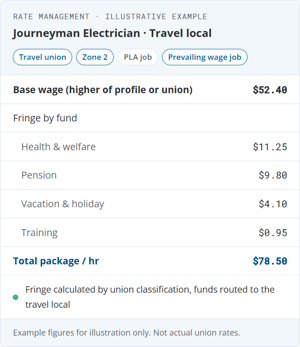
eBacon runs union payroll on the same certified payroll engine it uses for prevailing wage. Union and PLA rates, flags and mixed-classification agreements live in one Rate Management library. eBacon pays the higher of the profile or union-required rate, splits fringe by fund and produces union reports by employee, job and classification.
Store union and PLA rates in one Rate Management library and apply the right rate to every hour automatically.
eBacon keeps every union rate in its Rate Management library, including rate flags that apply per company, per employee or per job, and agreements that mix rates across two classifications. Payroll pulls the rate from the library automatically. Nobody retypes it.
There is no one-size-fits-all rate table for union payroll because labor agreements don't fit in one table. A PLA on one job, a different local on the next, and a foreman with his own negotiated flag all apply.
Before payroll runs, you can check what an employee should be paid on a job with eBacon's rate simulator.
What is union rate management?
Union rate management is the work of storing and applying the wage and fringe rates set by collective bargaining agreements and project labor agreements, by classification, local, area and job, so each hour is paid at the required base rate and each fringe dollar lands in the correct union fund.
eBacon stores every union and PLA rate, flag and mixed-classification agreement in one Rate Management library, and applies the right rate to each hour when payroll runs.
You keep your rates in one place you can see. Payroll pulls from that place. Nobody re-keys a rate sheet into a spreadsheet the night before the check run.


Why do union rates break most payroll systems?
Because a union rate is rarely just a number on a sheet. It can carry flags per company, per employee and per job, and some agreements mix rates across two classifications.
A single shared rate table can't hold that. eBacon learned this the hard way and built Rate Management so each company's union rates live in their own library, with the flags and mixed-classification rules attached to the rate itself.
Anyone who has received the new rate sheet the afternoon before payroll knows how that week goes. With Rate Management, the rate goes in once, where payroll reads it, and it stays there for the next run.

Can one employee work union in the field and non-union in the office?
Yes. eBacon runs union field work and non-union office work on one employee profile, so the estimator who pulls a few shifts on the tools doesn't need two records or a payroll clerk keeping score by hand.
Non-union office staff at a union shop can also use the eBacon 401(k), administered by eBacon with no third-party login.

How does eBacon handle travel locals and zone rates?
eBacon tracks home union and travel union rates and funds separately, including area and zone rates, so hours worked out of a crew's home area pay at the right rate into the right funds.
When the employee's profile rate and the union-required rate disagree, eBacon pays the higher one. Fringe always follows the union classification, never the profile.
How does eBacon split union fringe by fund?
eBacon splits union fringe into buckets by fund and produces union reports by employee, job and classification directly from payroll.
Fund buckets follow the format California's DIR requires, so certified payroll reports don't come back rejected. Dues and vacation in/out are handled on the check, and CA Apprentice Council training fund reporting is built in.
What is eBacon?
FAQs | Union Payroll
Listed below are the key questions union shops frequently ask eBacon. Still have questions? ...Contact us!
eBacon's trust is not an option because union funds already handle fringe under the collective bargaining agreement, CBA. Everything on the eBacon platform is available for union shops, except a fringe trust. Platform key features for union shops include: union payroll, rate management, certified payroll reports, field operations, safety system and workforce management.
Non-union office staff at a union shop can still use the eBacon 401(k).
To learn more about the advantages of eBacon's fringe trust for open-shop prevailing wage work, see the eBacon fringe trust page.
You choose the setup that fits your team. eBacon can build your initial union rates for you and walk your team through where they live, or your team can build them from day one. Either way, your team updates rates directly in the library when an agreement renews or an increase takes effect.
Yes. Union crews on public work still need certified payroll, and eBacon produces it from the same payroll run: WH-347 and state reports, fringe benefit statements, apprentice ratio compliance on the jobsite and automated restitution that recalculates and back-pays when rates or hours change.
Reporting rules, forms and e-filing differ by state. See the eBacon Certified Payroll page for yours.
Field Operations and Workforce Management come with it at no additional charge: GPS time tracking by job, toolbox talks, daily reports, employee records and workers' comp premium audit reporting.
Yes. eBacon's bona fide fringe trust is built specifically for non-union, open shop contractors working certified payroll and prevailing wage jobs. It is not a union benefit fund, so it is a structure any open shop contractor can utilize.
Yes. PLA rates sit in the same Rate Management library as your union rates, including agreements that mix rates across two classifications. eBacon applies the PLA rate to hours worked on that job, keeps fringe in the right fund buckets and carries the hours into certified payroll reports when the job is also prevailing wage.