

Advantages Checklist
eBacon's exclusive bona fide fringe trust is a proven money saving $$$ solution! See all the advantages...

Integrations
Supported Accounting Packages
API

The certified payroll report Form WH-38 documents for Oregon prevailing wage compliance on certain public works projects, and mistakes on this form can delay payment, trigger corrections, or lead to audit findings. For construction payroll teams, knowing how to fill out Form WH-38 correctly is required to stay compliant and keep jobs funded.
Form WH-38 verifies worker classifications, daily hours, wage rates, and fringe benefit payments. Errors often happen when payroll teams rush through the form or rely on assumptions instead of confirmed records.

This guide explains how to complete Form WH-38 accurately and includes a line-by-line checklist you can use while filling out the form.
Form WH-38
A certified payroll report used by certain awarding agencies to verify prevailing wage compliance.
Certified Payroll
A weekly report confirming workers were paid correctly under applicable wage determinations.
Prevailing Wage
The minimum hourly wage and fringe benefit rate required on public construction projects.
Statement of Compliance
The signed certification confirming payroll data is accurate and complete.
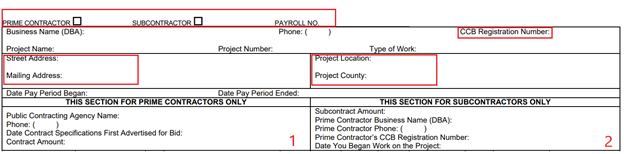
Complete the header section with:
This information must match the contract and payroll records exactly.
Each worker must be listed on their own line with:
Classifications must align with the wage determination for the project.
Enter hours worked by day, separating straight time and overtime where required.
Do not average hours across the week. Agencies review daily totals.
Report:
Rates must meet or exceed prevailing wage requirements.
Indicate whether fringe benefits are:
Amounts must match payroll and supporting documentation.
An authorized representative must sign and date the Statement of Compliance. This signature certifies accuracy and carries legal responsibility.
Unsigned forms are incomplete.
Construction Payroll Managers and Owners learn why digital time tracking is the best place to capture details job costing for P&L, and how digital tracking can reduce paper management and prevent time rounding.
Use this checklist while completing Form WH-38 to avoid common errors.
Payroll platforms like eBacon help teams reduce WH-38 errors by keeping time, wages, classifications, and fringe data aligned in one workflow.

Payroll teams most often run into problems when they:
Each issue increases review time and audit risk.

Form WH-38 is a compliance document, not just a reporting task. Accuracy protects payment timelines and reduces audit exposure.
Strong WH-38 practices include:
See how eBacon simplifies certified payroll reporting and compliance tracking. Book a quick demo.

The awarding agency or contract documents will specify whether Form WH-38 is required. Some agencies allow alternative certified payroll formats.
No. WH-347 is the federal standard certified payroll form. WH-38 is required by certain agencies or jurisdictions.
Incorrect forms may be rejected, delaying payment and triggering follow-up reviews.
Most agencies require certified payroll records to be retained for at least three years. Some states require longer retention.
The material presented here is educational in nature and is not intended to be, nor should be relied upon, as legal or financial advice. Please consult with an attorney or financial professional for advice.
.jpg?width=153&height=191&name=HensleysPaving-thumb%201%20(1).jpg)
